Water Eject iPhone 12 – Quick Fix for Wet iPhone Speakers
iPhone 12 speaker sounds muffled. Calls are distant. Music sounds hollow. You know it got wet and you know something is blocking the speaker — but you are not sure what to do first. The answer is acoustic ejection: a precise 165Hz tone played through the iPhone 12 speaker that vibrates trapped moisture outward through the grille in 60 seconds. Same physics as Apple Watch Water Lock. Free, in Safari, right now. The longer you wait, the worse it gets — water left inside the iPhone 12 speaker chamber begins leaving mineral deposits on the diaphragm surface within hours.
Eject Water from iPhone 12 Speaker Now — Free, Works in Safari.
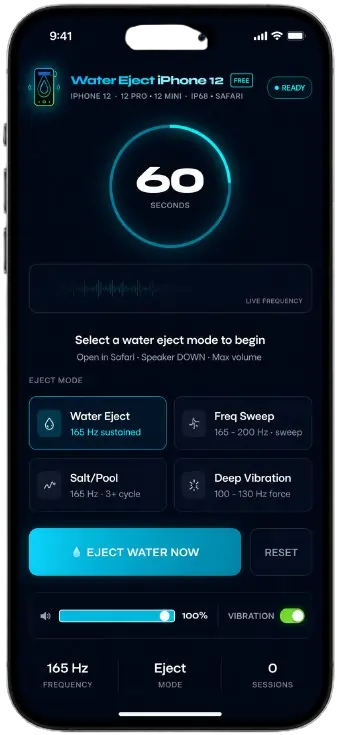
Water Eject iPhone 12FREE
iPhone 12 · 12 Pro · 12 Mini · IP68 · Safari
iPhone 12 Speaker Cleared ✓
Water ejected · Test audio with Voice Memos
Water Eject iPhone 12 Tool
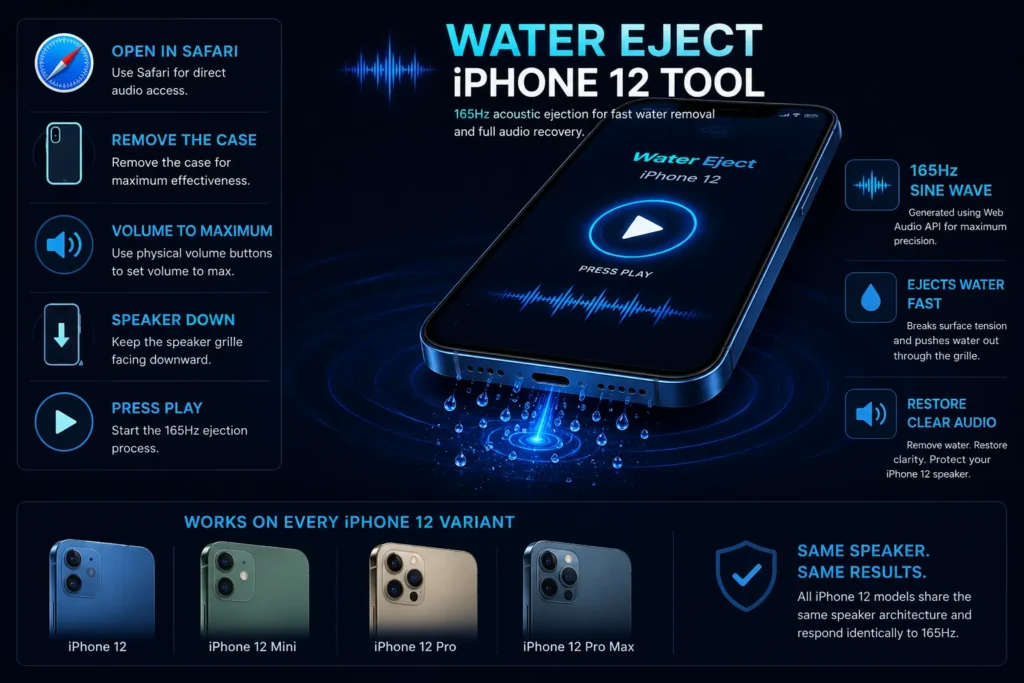
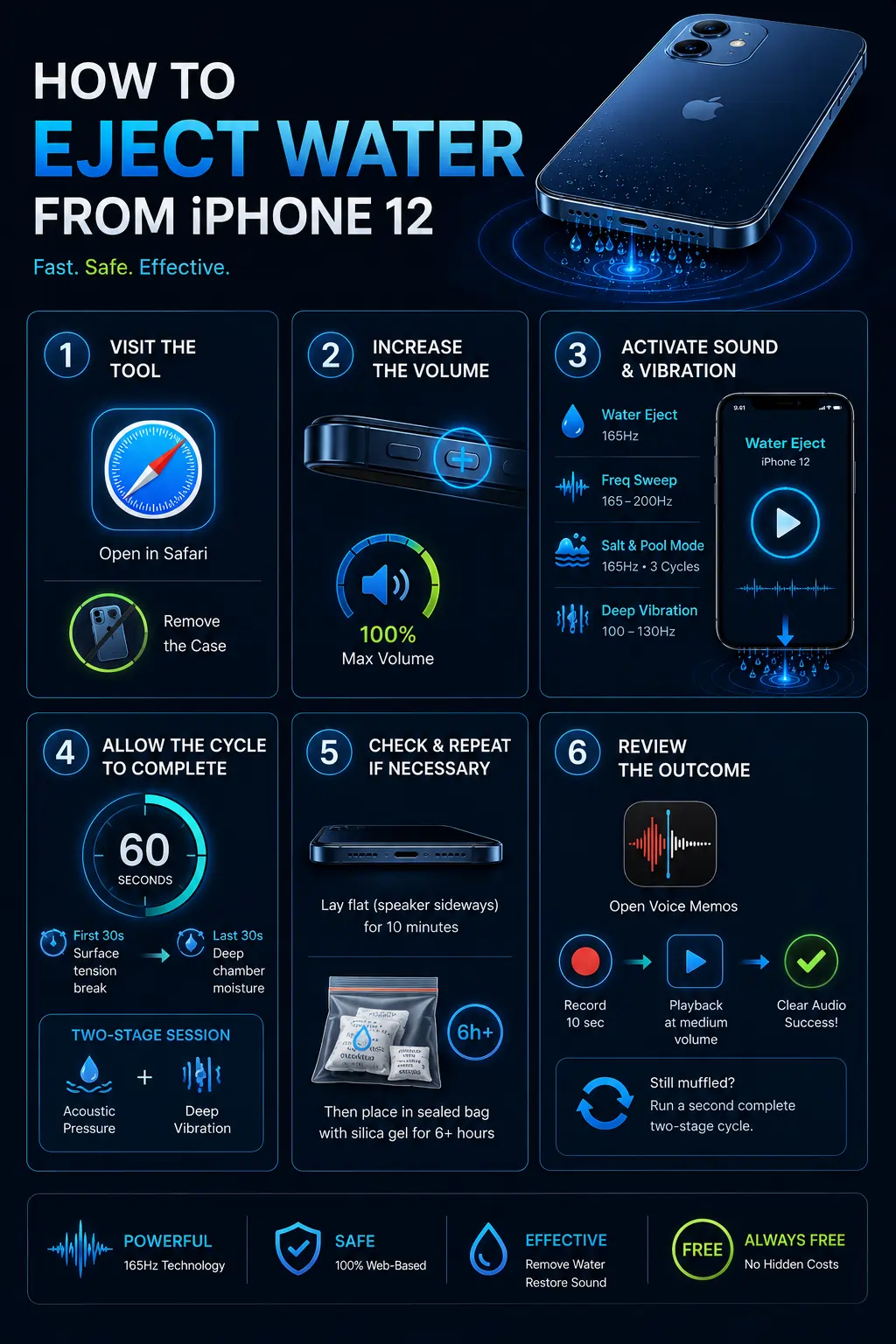
Open in Safari on your iPhone 12. Remove the case. Volume to maximum using the physical buttons. Speaker grille facing downward. Press play.
The tool generates a 165Hz sine wave through the Web Audio API, delivered directly to the iPhone 12 speaker hardware. That frequency matches the natural resonant frequency of the iPhone 12 speaker membrane — creating amplified diaphragm vibration that breaks the surface tension holding water droplets against the grille mesh and pushes moisture outward. Visible water droplets exit the grille within the first 20–30 seconds on most devices.
Works on every iPhone 12 variant: iPhone 12, iPhone 12 Mini, iPhone 12 Pro, and iPhone 12 Pro Max. All four models share the same speaker architecture and respond identically to the 165Hz ejection frequency.
Start Water Eject for iPhone 12
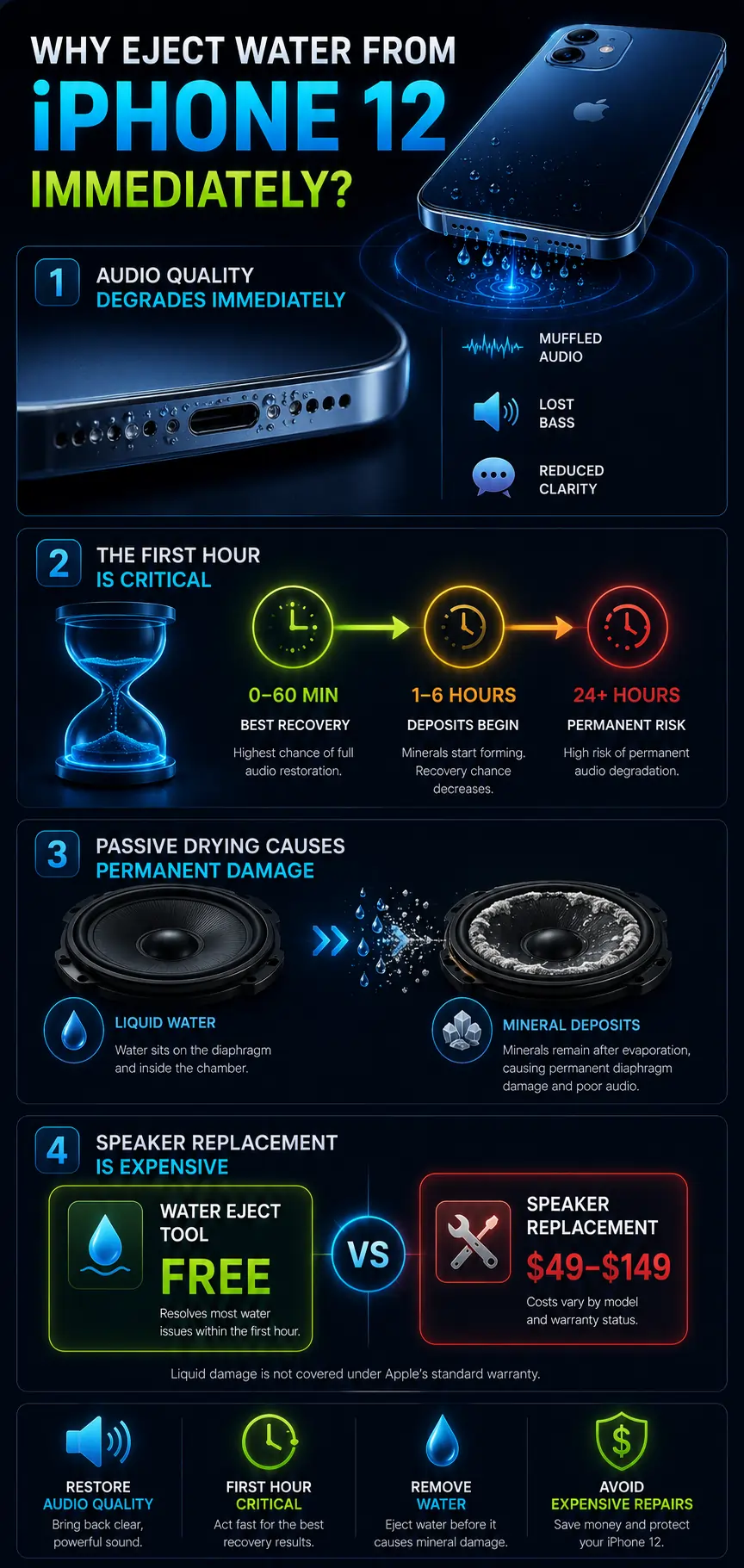
Why It’s Important to Eject Water from Your iPhone 12
Audio quality degrades immediately. Water on the iPhone 12 speaker diaphragm physically restricts membrane movement. Bass frequencies disappear first — they require the most diaphragm excursion and are most sensitive to physical restriction. Voice clarity drops next. The muffled, thin audio quality iPhone 12 users describe after water exposure is a direct mechanical result of membrane restriction — not electronics failure. It reverses when the water is removed.
The first hour is the critical window. Freshwater gives you approximately 60 minutes before mineral deposits begin forming on the diaphragm. Saltwater, sweat, and pool water start this process faster — act within 15–30 minutes for any conductive liquid exposure. Every hour of delay narrows the probability of complete single-session audio restoration.
Passive drying is not neutral — it causes damage. Waiting for the iPhone 12 speaker to dry on its own means allowing water to evaporate at its own pace inside the speaker chamber. As it does, dissolved minerals it carried deposit directly onto the diaphragm surface. In tap water, pool water, and sweat, these mineral compounds accumulate into a layer of surface roughness that permanently degrades acoustic performance — even after all visible moisture is gone. Acoustic ejection before evaporation removes water while it is still liquid, carrying dissolved compounds out with it.
Speaker replacement is expensive.Water Eject iPhone 12 speaker replacement at an Apple Authorised Service Provider costs between $49 and $149 depending on the model and warranty status. Liquid damage is excluded from Apple’s standard warranty coverage. The water eject tool costs nothing and resolves the majority of iPhone 12 water-related speaker problems when used within the first hour.
How to Eject Water from iPhone 12
Step 1 — Visit the Fix My Speaker Tool
Open Safari on your iPhone 12 and navigate to the water eject tool. Safari is the correct browser for this — not Chrome. On iOS, Safari provides direct Web Audio API access to theWater Eject iPhone 12 hardware speaker driver. Chrome on iOS routes audio through an additional processing layer that reduces acoustic pressure output at the speaker. This single browser choice affects ejection quality significantly on Water Eject iPhone 12
Before pressing anything: remove the Water Eject iPhone 12 case completely. Cases absorb vibration and reduce ejection effectiveness by up to 40 percent. Even thin cases dampen the acoustic energy before it reaches the speaker housing. Run every ejection cycle on the bare device.
Step 2 — Increase the Volume
Raise volume to 100 percent using the physical volume up button on the left side of the iPhone 12. Do not use Control Centre or the Settings slider — physical button maximum volume ensures the system audio output is uncapped. Volume determines the acoustic pressure amplitude available for surface tension disruption. At 50 percent volume, the 165Hz tone does not generate sufficient diaphragm vibration to overcome water adhesion. Maximum volume is the baseline requirement, not a preference.
Step 3 — Activate Sound and Vibration
Match the ejection mode to your water exposure type before pressing play:
Water Eject — 165Hz. Standard freshwater, rain, or general splash exposure. Default starting point for most iPhone 12 water exposure situations.
Frequency Sweep — 165–200Hz. Sweat or gym exposure. Sweat has slightly different viscosity than water — the broader sweep range accounts for this and covers device-to-device membrane variation more completely than a fixed tone.
Salt & Pool Mode — 165Hz triple cycle. Pool water, ocean water, or heavy sweat exposure. Runs three consecutive cycles at 90 seconds total to maximize moisture removal before dissolved mineral compounds from conductive liquids can begin depositing on the iPhone 12 diaphragm surface.
Deep Vibration — 100–130Hz. Run this immediately after any primary mode as a second stage. Lower frequency mechanical force reaches moisture that the acoustic pressure phase loosened but did not fully expel from the deeper speaker chamber.
Hold the iPhone 12 with the bottom speaker grille facing straight down before pressing play. Gravity and acoustic pressure both direct moisture toward the grille opening in this orientation — together they produce significantly faster ejection than horizontal placement.
Step 4 — Allow the Cycle to Complete
Let the full 60-second cycle run without stopping. The first 30 seconds of the primary cycle use acoustic pressure at 165Hz to break surface tension on moisture adhered to the diaphragm face and speaker mesh — this is the phase where visible water droplets exit the grille. The final 30 seconds target deeper chamber moisture that the initial phase loosened but did not expel. Stopping early cuts this second half short-Water Eject iPhone 12.
Immediately after the primary cycle, run Deep Vibration mode without delay. This completes the two-stage session: acoustic pressure first for surface tension disruption, mechanical vibration second for deeper chamber moisture. Both stages in sequence produce more complete results than either stage alone.
Step 5 — Check and Repeat if Necessary
After both modes complete, lay the iPhone 12 flat with the speaker facing sideways for 10 minutes. Then place it in a sealed bag with silica gel packets for 6 hours minimum. Silica gel absorbs residual water vapor — the microscopic moisture film that remains on internal surfaces after liquid water has been expelled acoustically. This follow-up step is most important after pool water, ocean water, or sweat exposure.
Step 6 — Review the Outcome
Open the Voice Memos app on the Water Eject iPhone 12, record 10 seconds of speech at arm’s length, and play it back at medium volume. This is a more reliable audio recovery test than music — voice recordings isolate mid-frequency speaker clarity and reveal residual muffling that music’s mixed frequency content can mask. Clear, undistorted voice playback at normal volume confirms successful water ejection.
If audio is still partially muffled after the first two-stage session, run a second complete cycle before drawing conclusions. One cycle handles most freshwater exposure cases. Two cycles are standard for heavy submersion, saltwater, or water that was in the speaker for more than 30 minutes before ejection began.
Manual Methods to Remove Water from iPhone 12
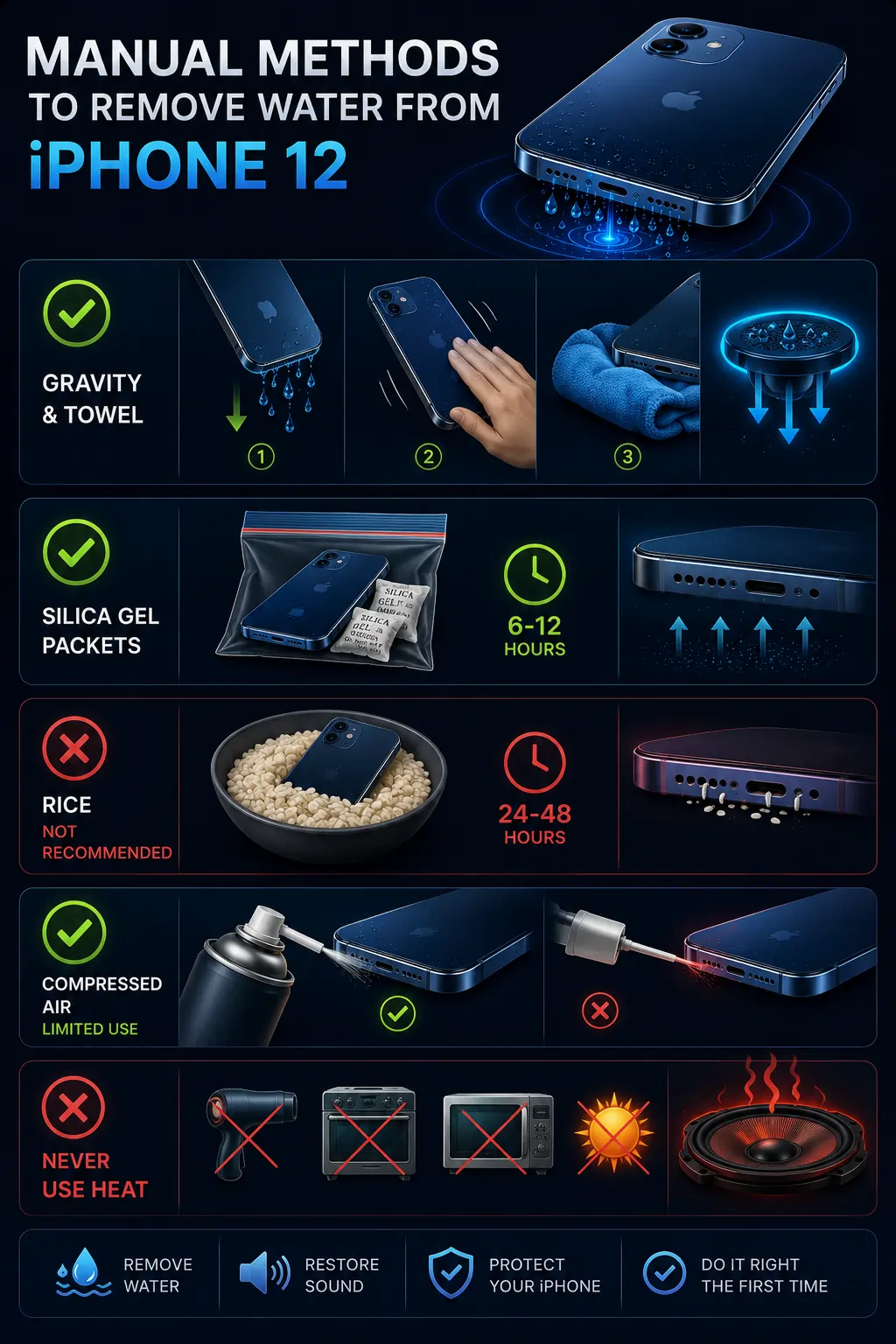
Gravity and towel — use first, not last. Hold the iPhone 12 with the speaker facing downward and tap the back firmly with your palm several times. This dislodges the largest, most recently entered water droplets near the grille surface and prepares the speaker for acoustic ejection. It is a useful first step — not a substitute. Gravity alone cannot overcome surface tension on droplets already adhered to the diaphragm from the inside-Water Eject iPhone 12.
Silica gel packets — use after, not instead. Silica gel is a passive desiccant that absorbs water vapor from the air around the device. It does not reach liquid water inside the speaker chamber. Use it as a follow-up after acoustic ejection — 6 to 12 hours in a sealed bag — to handle residual vapor that remains after liquid removal. Using silica gel alone means allowing liquid water to evaporate on its own timeline, which deposits minerals on the iPhone 12 diaphragm during the process.
Rice — not recommended. Rice absorbs ambient humidity marginally. It cannot reach water inside the iPhone 12 speaker chamber, takes 24–48 hours, and leaves organic particles near phone openings. The improvement users notice after the rice method is primarily from natural evaporation over time — the rice is incidental. Silica gel is significantly more effective as a passive follow-up and carries no particle risk.
Compressed air — limited use only. Short bursts of compressed air at an angle can clear loose surface material from the Water Eject iPhone 12 speaker grille exterior before running the acoustic cycle. Do not direct compressed air into the grille opening — inward pressure pushes surface droplets through the mesh and deeper into the chamber. Use only as a pre-treatment for grille surface debris, never as the primary water removal method.
Never use heat. Hairdryers, ovens, microwave, and direct sunlight all warp the iPhone 12 speaker diaphragm permanently. The membrane is a precision polymer film with specific tension — heat deforms it irreversibly. Acoustic ejection uses no heat and carries no diaphragm damage risk-Water Eject iPhone 12.
How Does the Fix My Speaker Tool Work on iPhone 12?
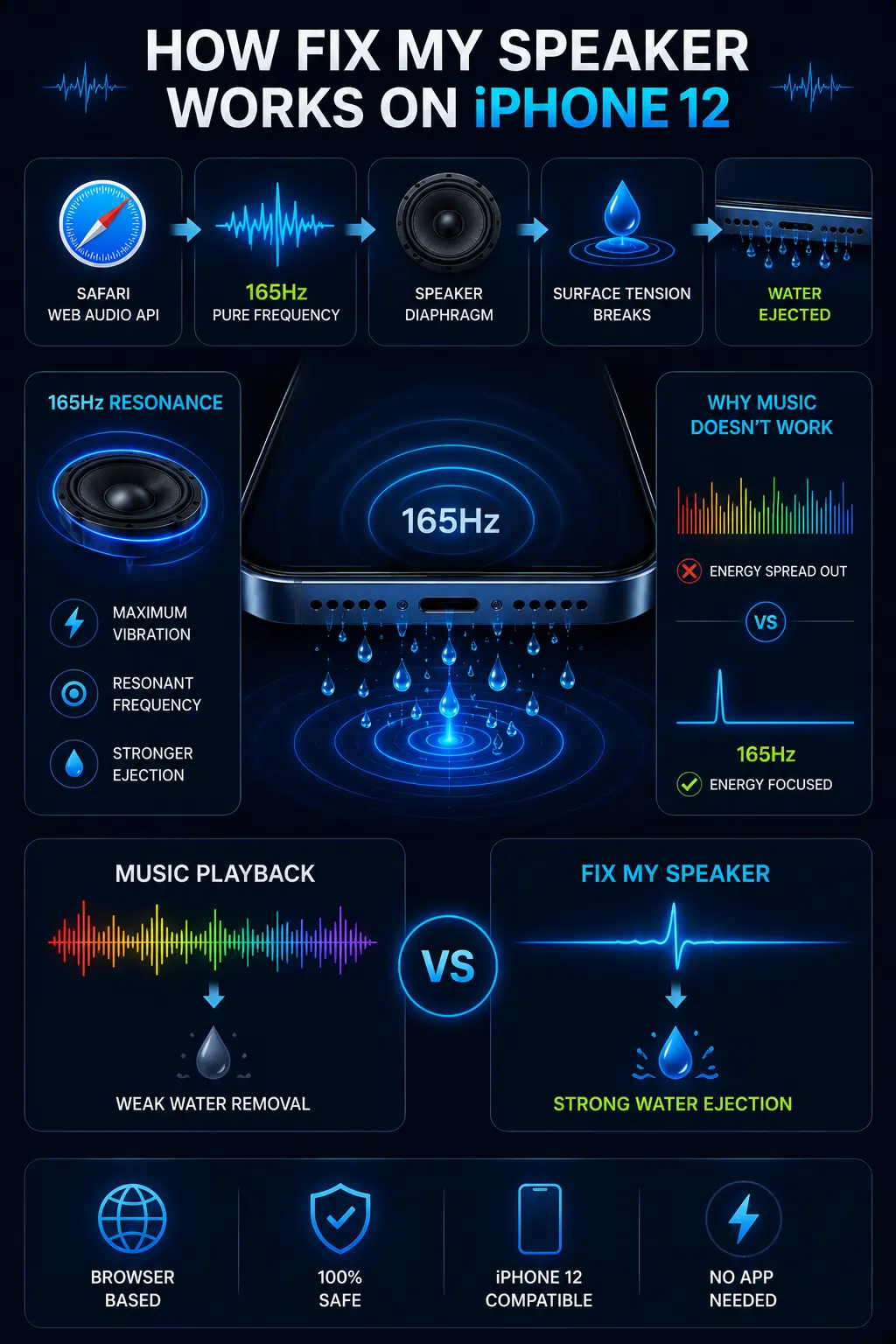
The Water Eject iPhone 12 tool uses the Web Audio API built into every version of iOS Safari to generate a pure sine wave oscillator at 165Hz. The oscillator connects through a gain node that controls output amplitude, with a 500-millisecond soft start ramp at cycle beginning to prevent acoustic transients.
At 165Hz — the resonant frequency of iPhone 12 speaker membranes — the diaphragm vibrates with maximum amplitude for a given power input. This resonant amplification creates acoustic pressure at the membrane surface that exceeds the surface tension force holding water droplets against the diaphragm and mesh. Once that adhesion force is overcome, acoustic momentum and gravity direct the droplet toward the grille opening where it exits.
The tool is not modifying the iPhone 12 software, accessing hardware registers, or doing anything that standard music playback does not do. It is playing a single precise frequency through the speaker output — the same hardware pathway that every piece of audio on the iPhone 12 uses.
The only difference from music is frequency precision: 165Hz rather than a broad audio spectrum, which concentrates all available acoustic energy at the resonant ejection point rather than distributing it across hundreds of frequencies.
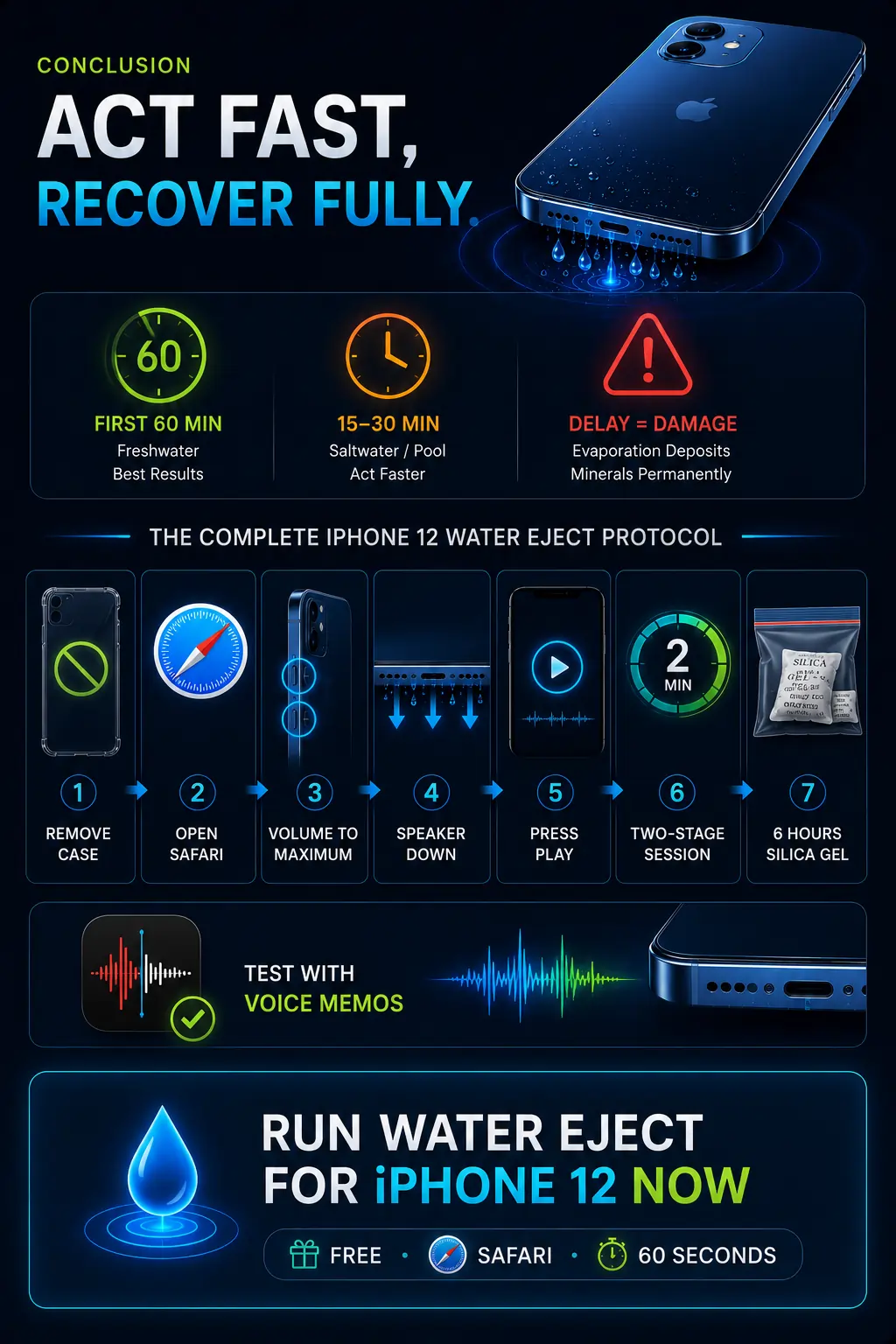
Conclusion — Act Fast, Recover Fully.
iPhone 12 speaker water damage is almost entirely a timing problem. The acoustic ejection mechanism works on liquid water. Once that water evaporates — with or without the rice method, silica gel, or simply waiting — it deposits minerals on the iPhone 12 diaphragm that change how the membrane moves permanently. Acting within the first 60 minutes of freshwater exposure, or the first 15–30 minutes of saltwater or pool water exposure, produces the highest recovery rates with a single two-stage session.
Remove the case. Open Safari. Volume to maximum. Speaker down. Press play. Two minutes for a complete two-stage session. Six hours of silica gel. Test with Voice Memos. This is the complete iPhone 12 water eject protocol — and it costs nothing.
Run Water Eject for iPhone 12 Now — Free, Safari, 60 Seconds
Apple confirms that iPhone 12 carries an IP68 water
resistance rating but recommends immediate drying steps
after any liquid exposure — detailed on their official page.
For iPhone 13 water damage recovery using the same
165Hz acoustic ejection protocol, visit the dedicated
water eject iPhone 13 page.