Water Eject – Remove Water from Your Phone Speaker Instantly
Your phone just got wet. The speaker sounds muffled, distorted, or completely silent. Every second water sits inside the speaker chamber increases the corrosion risk on internal contacts and reduces the chance of full audio recovery. The water eject tool plays a targeted 165Hz acoustic tone that vibrates trapped moisture out through the speaker grille — the same principle Apple built into Apple Watch Water Lock — free, in your browser, in 60 seconds.
Eject Water from Speaker Now — Free, 60 Seconds
Water Eject ToolFREE
165 Hz Acoustic Ejection · All Devices
Water Ejected ✓
Moisture cleared · Speaker audio fully restored
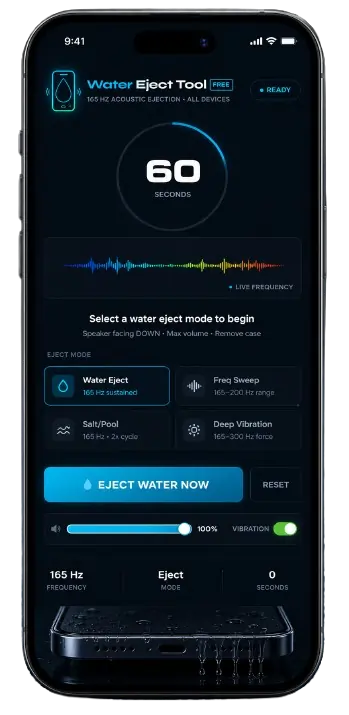
Water Eject Tool
This speaker drying tool is a free browser-based acoustic tool that removes water from phone speakers using a calibrated 165Hz sound frequency. When this tone plays through the speaker, it creates acoustic pressure at the diaphragm’s natural resonant frequency — vibrating with enough force to break the surface tension holding water molecules against the membrane and pushing trapped moisture outward through the speaker grille opening.
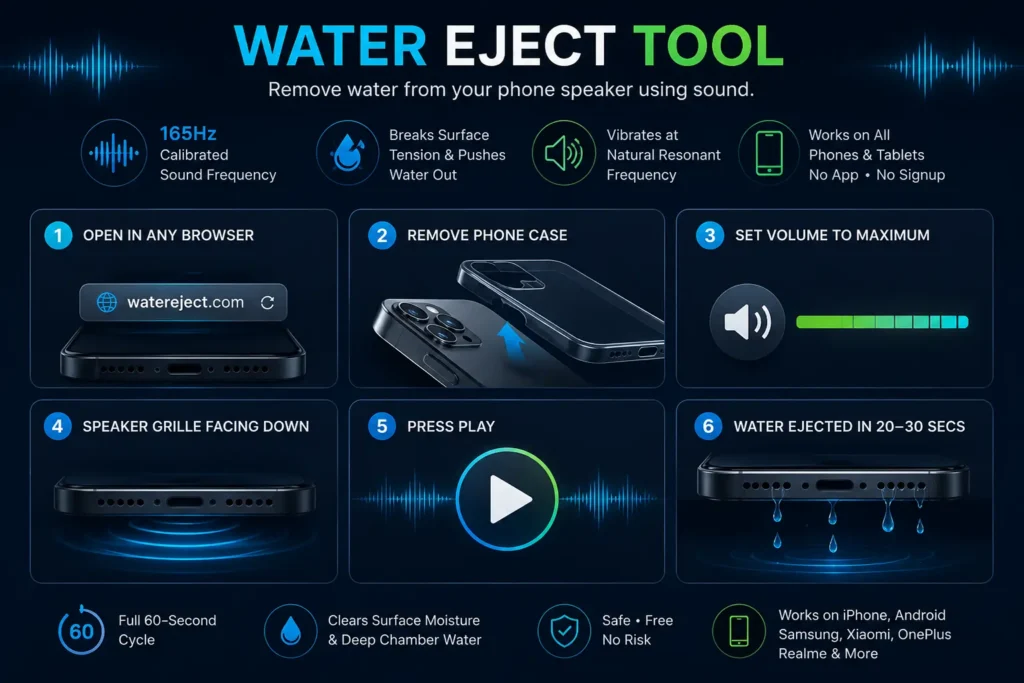
Open it in any browser. Remove your phone case.
Set volume to maximum. Hold the phone with the speaker grille facing downward. Press play. Water droplets visibly exit the grille within the first 20–30 seconds on most devices. The full 60-second cycle clears both surface moisture and deeper chamber water in a single pass.
Works on every iPhone, Android, Samsung, Xiaomi, OnePlus, Realme, and tablet. No app download. No signup. No risk.
What Is Water Eject?
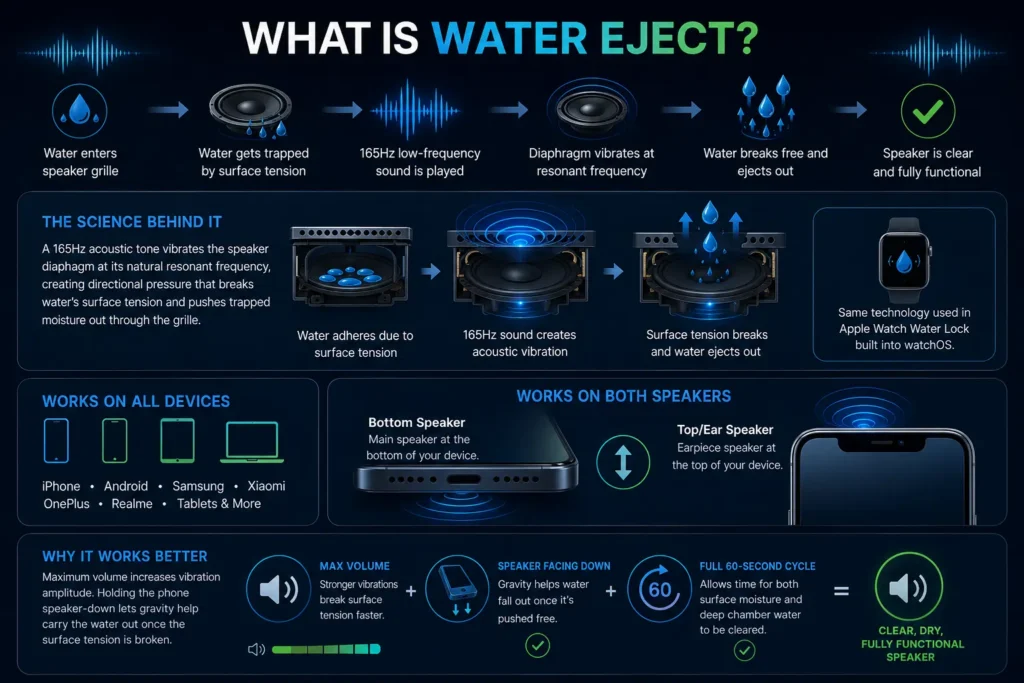
Water eject is an acoustic method for removing water from phone speakers by playing a precise low-frequency sound tone through the speaker that causes the diaphragm to vibrate at its resonant frequency. This targeted vibration creates directional acoustic pressure that breaks water’s surface tension — the molecular cohesion force that holds liquid droplets in contact with solid surfaces — and propels the water outward through the same grille opening it entered.
The physics behind this tool is well established. Apple implemented it in Apple Watch Water Lock as a built-in feature in watchOS, where the watch plays an acoustic ejection tone on command after water exposure. This water ejection tool applies the same principle to all smartphones through the browser’s Web Audio API, requiring no installation because the acoustic mechanism works through any speaker output regardless of the device or operating system.
Water eject works on both the main bottom speaker and the ear speaker at the top. Surface tension is the reason water does not simply drain out of a speaker grille — the liquid adheres to the mesh and diaphragm surface.
Once the acoustic frequency breaks that surface tension, gravity and continued vibration carry the water outward. This is why maximum volume and downward phone orientation together produce faster, more complete acoustic ejection than acoustic vibration alone.
How to Use the Water Eject Tool — Step by Step
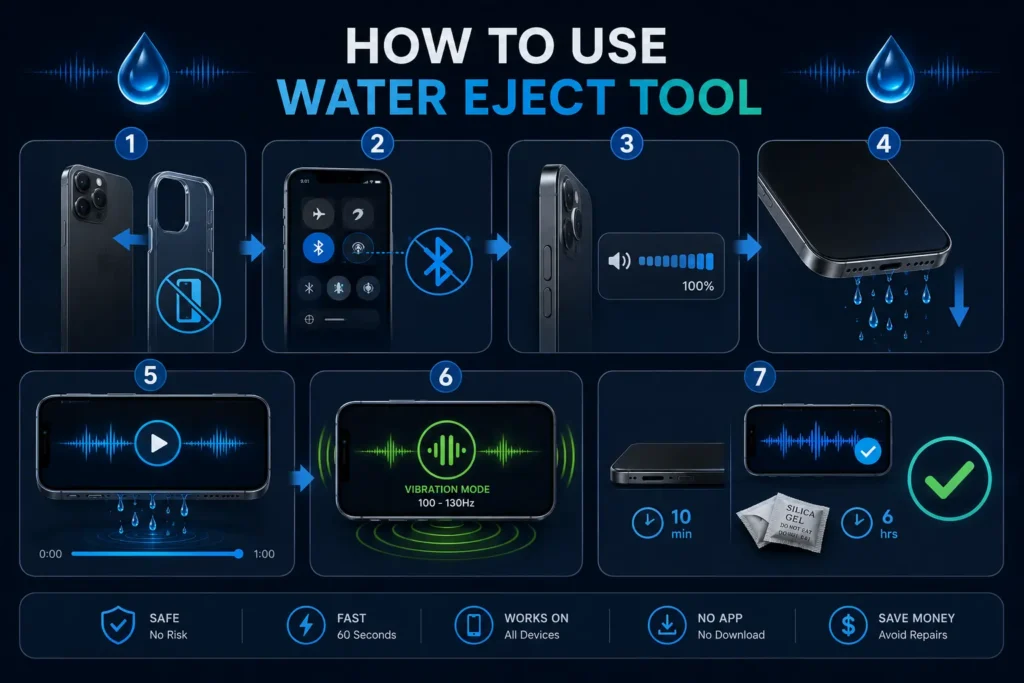
Step 1 — Remove your phone case completely. Phone cases absorb vibration and block the speaker grille, reducing acoustic ejection effectiveness by up to 40 percent. Remove it before starting.
Step 2 — Turn off Bluetooth. Bluetooth headphones redirect audio output away from the device speaker. This ejection tool tone must play through the phone speaker itself to create the acoustic pressure needed for moisture ejection. Disconnect all Bluetooth devices first.
Step 3 — Set volume to maximum. Use the physical volume buttons to raise volume to 100 percent. Maximum volume creates the strongest acoustic pressure — at 50 percent volume the vibration amplitude is insufficient to break surface tension on water droplets pressed against the diaphragm. On Android, check that no media volume limiter is capping output in sound settings.
Step 4 — Hold the phone with speaker facing down. Gravity assists acoustic ejection when the speaker opening faces downward. Water droplets that the acoustic pressure dislodges from the mesh and diaphragm fall outward through the grille rather than deeper into the chamber.
Step 5 — Press play and run the full cycle. Watch the speaker grille during playback — visible water droplets exiting the grille confirm the ejection is working. Do not stop the cycle early. The 60-second run covers surface moisture in the first 20–30 seconds and deeper chamber moisture in the final 30 seconds.
Step 6 — Switch to Vibration Mode immediately after. Low-frequency pulses at 100–130Hz create mechanical force that reaches deeper into the speaker chamber and dislodges residual moisture the initial sound wave cycle loosened but did not fully eject. Running both modes back-to-back produces the most complete single-session water removal.
Step 7 — Dry and test. After both cycles complete, lay the phone flat with the speaker facing sideways for 10 minutes. Then test audio at medium volume with a voice recording. Clear, undistorted sound confirms full moisture removal. For saltwater or heavy submersion, follow with silica gel packets for 6 hours to absorb any residual internal moisture.
Water in your speaker right now? Start the eject cycle immediately — 60 seconds.
Water Eject for Different Water Types.
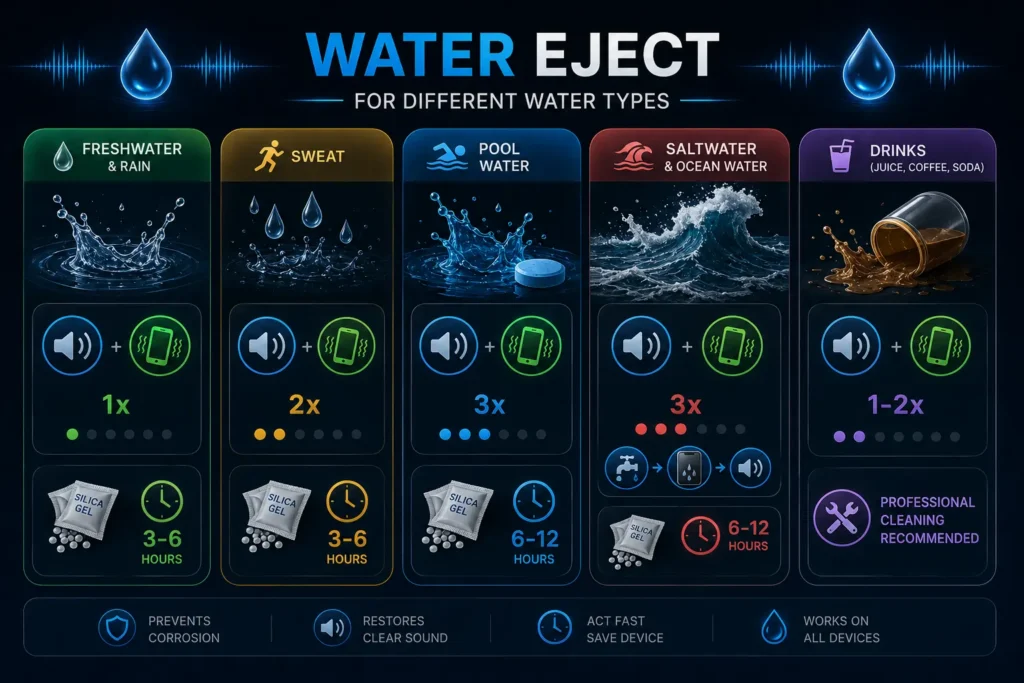
Not all water exposure is equal. The type of water determines how aggressively you need to run the water eject cycle.
Freshwater and rain. Least corrosive. Run one complete water eject cycle at maximum volume followed by Vibration Mode. Silica gel drying for 3–6 hours as a follow-up is sufficient.
Sweat. Moderately conductive — contains salt and mineral ions. Run the ejection tool cycle twice consecutively. Sweat residue dries into conductive mineral deposits more aggressively than freshwater. Act within the first 30 minutes of heavy sweat exposure.
Pool water. Contains chlorine and mineral treatment chemicals. Run three complete ejection tool cycles. The chemical residue from pool water accelerates corrosion faster than plain saltwater. Follow with silica gel drying for 6–12 hours minimum.
Saltwater and ocean water. Most urgent. Salt water is highly electrically conductive and begins corroding internal speaker contacts within minutes of exposure.
Run the water ejection cycle three times immediately. If possible, rinse the phone exterior with fresh water before running the eject cycle — this dilutes the salt concentration and the water eject then removes diluted moisture rather than concentrated saltwater.
Drinks — juice, coffee, soda. Sugary and acidic liquids are more corrosive than water and leave sticky residue on the diaphragm that does not respond well to acoustic ejection alone.
Run the water ejection cycle immediately to remove the liquid, then visit a professional for physical cleaning of the sugary residue from internal components.
Pani Nikalne Wala App — Phone Speaker se Pani Kaise Nikalen.
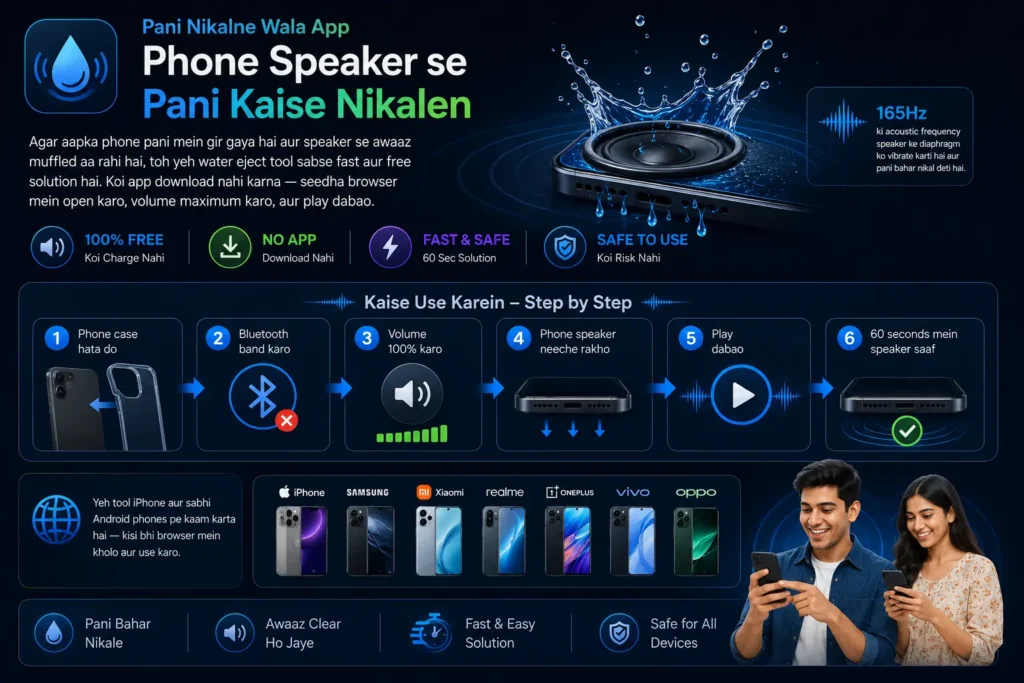
Agar aapka phone pani mein gir gaya hai aur speaker se awaaz muffled aa rahi hai, toh yeh water eject tool sabse fast aur free solution hai. Koi app download nahi karna — seedha browser mein open karo, volume maximum karo, aur play dabao. 165Hz ki acoustic frequency speaker ke diaphragm ko vibrate karti hai aur pani bahar nikal deti hai.
Kaise use karein: Phone case hata do. Bluetooth band karo. Volume 100% karo. Phone speaker neeche ki taraf rakho. Play dabao. 60 seconds mein speaker saaf ho jaata hai.
Yeh tool iPhone aur sabhi Android phones pe kaam karta hai — Samsung, Xiaomi, Realme, OnePlus, Vivo, Oppo — kisi bhi device ke browser mein kholo aur use karo.
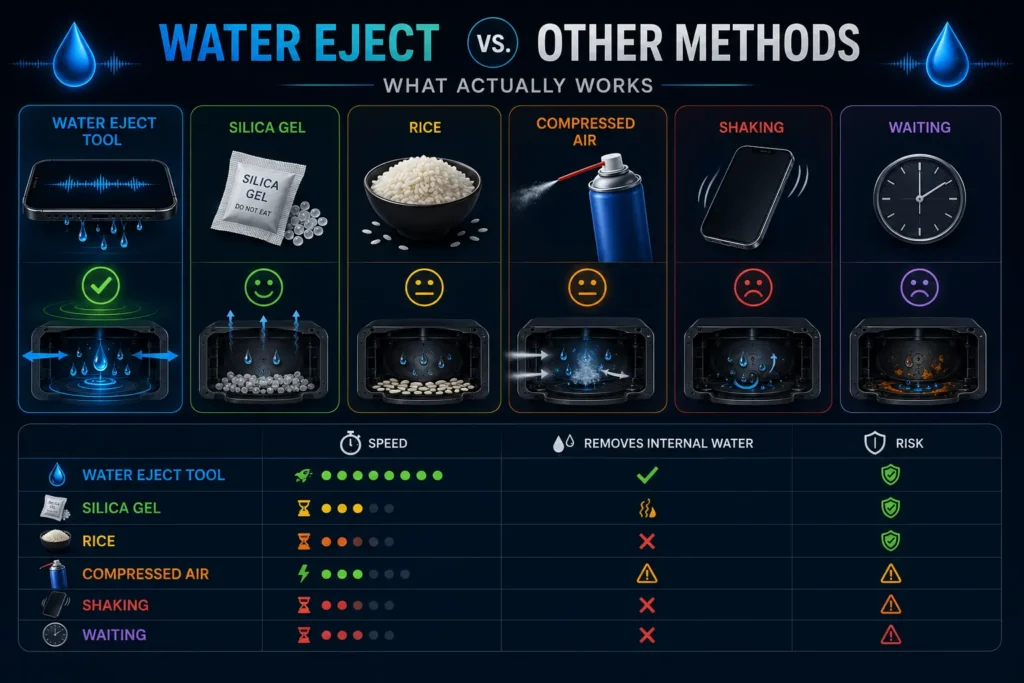
Water Eject vs. Other Methods — What Actually Works
Most users who delay water eject try alternative methods first. Understanding why these alternatives fail explains why immediate acoustic ejection is the only effective approach.
The rice method. Placing a wet phone in uncooked rice is the most commonly recommended alternative. Rice absorbs ambient humidity — it cannot reach water inside a sealed speaker chamber, cannot break surface tension on water adhered to internal components, and takes 24–48 hours to produce minimal results. Rice also leaves organic particles near phone openings. Water eject produces better results in 60 seconds.
Silica gel packets. Significantly more effective than rice for ambient humidity absorption. Still cannot actively remove water from inside the speaker chamber — silica gel absorbs moisture that has already evaporated into gas form. Use silica gel as a follow-up after Acoustic ejection, not as a replacement for it.
Compressed air. Moderate risk. Air pressure can push surface water through the speaker mesh and deeper into the chamber, converting surface moisture into internal moisture. If used, keep the can at distance and use short angled bursts. Never insert a compressed air nozzle directly against the speaker grille.
Shaking the phone. Moves water around inside the device without directing it toward any exit point. Can push water from the speaker chamber into adjacent areas of the device. Not recommended.
Waiting. Water evaporates eventually — but the mineral and salt deposits it leaves behind cause more long-term damage than the liquid water itself. Waiting is the option that causes the most preventable speaker damage.
| Method | Speed | Removes Internal Water | Risk |
| Water Eject Tool | 60 seconds | Yes | Very Low |
| Silica Gel | 6–12 hours | Ambient only | Low |
| Rice | 24–48 hours | No | Low |
| Compressed Air | Instant | Can push deeper | Medium |
| Waiting | 24–48 hours | No | High (corrosion) |
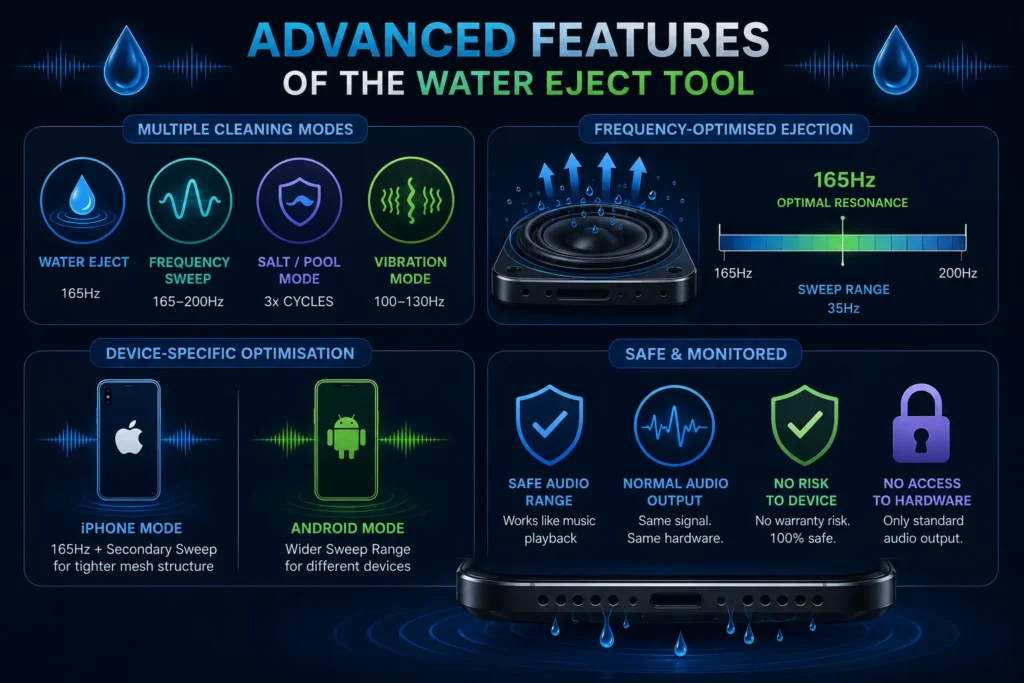
Advanced Features of the water removal Tool
Frequency-Optimised Ejection. The 165Hz frequency is not arbitrary — it is the resonant frequency point most effective for breaking the surface tension of water droplets against smartphone speaker membranes. Using a higher or lower frequency produces weaker ejection because it misses the diaphragm’s resonant peak. The sweep variant covers a 35Hz range above 165Hz to handle device-to-device variation in speaker resonant frequency.
Device-Specific Optimisation. iPhone speakers have different mesh weave density and diaphragm characteristics than Android speakers. The iPhone mode uses 165Hz as the primary tone with a secondary sweep that addresses the tighter mesh structure of Apple speaker grilles. Android devices use a slightly wider sweep range to accommodate the variation across manufacturers.
Safe and Monitored. The Acoustic ejection tone operates within the normal audio output range of smartphone speakers. It is identical in electrical terms to music playback — the same signal type, the same hardware pathway. No warranty risk. No software modification. The tool has no access to device hardware beyond standard audio output.
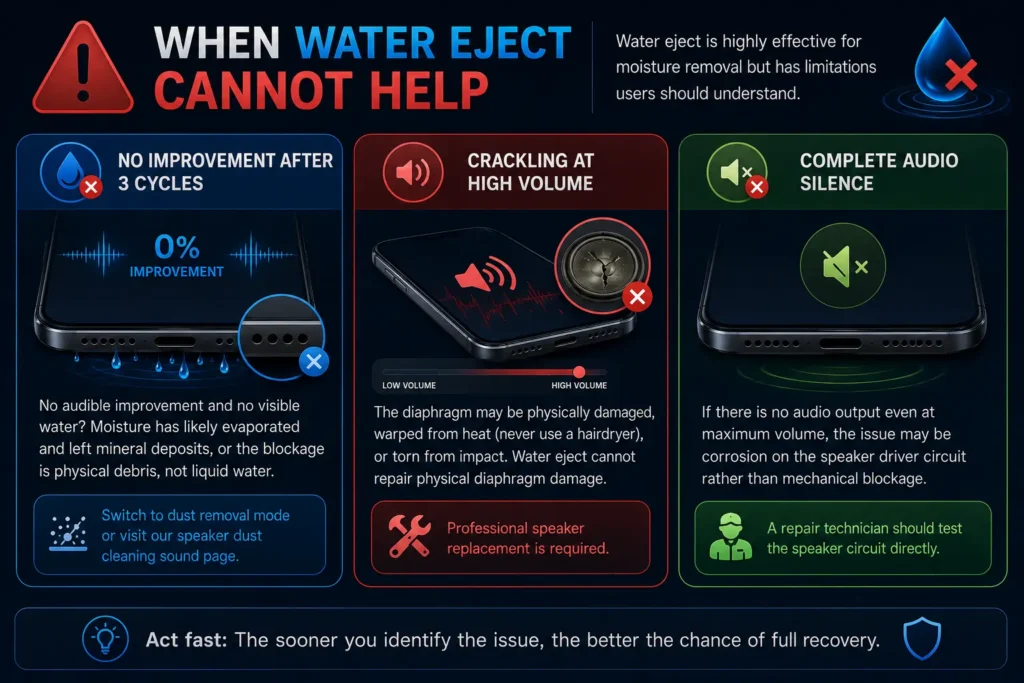
When Water Eject Cannot Help
Water eject is highly effective for moisture removal but has limitations users should understand.
If three complete Acoustic ejection cycles at maximum volume produce zero audible improvement and no visible water exits the speaker grille during playback, the moisture has likely already evaporated and left mineral deposits, or the blockage is physical debris rather than liquid water. In this case, switch to the dust removal mode or visit our speaker dust cleaning sound page.
If crackling occurs specifically when volume is raised — not at low volume — the diaphragm itself may be physically damaged, warped from heat exposure (never use a hairdryer on a wet speaker), or torn from impact. Water eject cannot repair physical diaphragm damage. Professional speaker replacement is required.
If the phone experiences complete audio silence with no output even at maximum volume, the issue may be corrosion on the speaker driver circuit rather than mechanical blockage. A repair technician should test the speaker circuit directly.
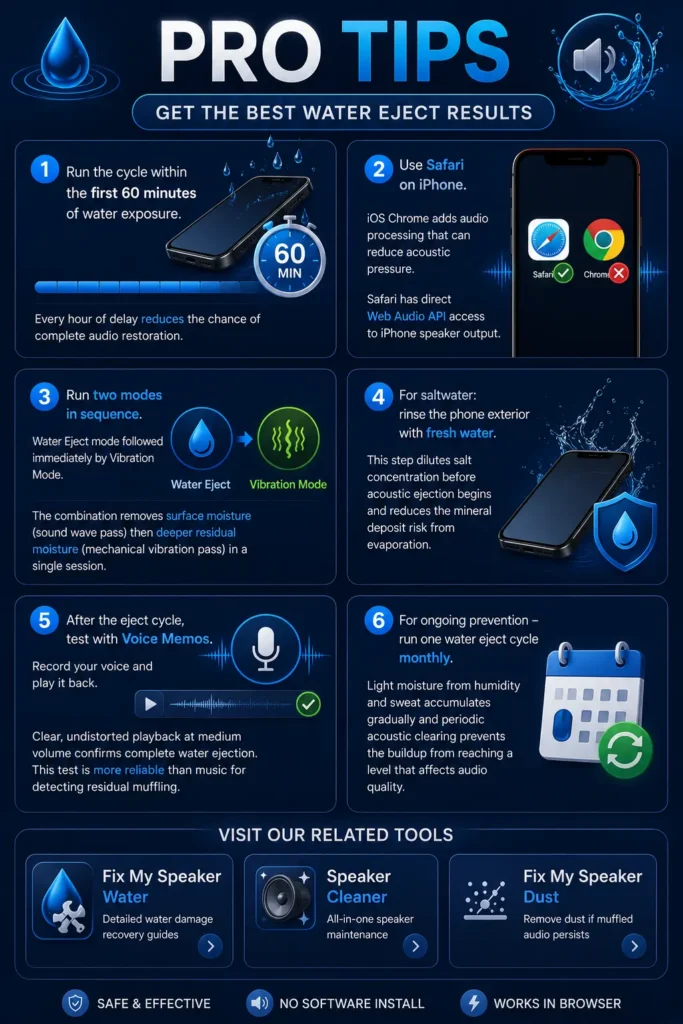
Pro Tips — Get the Best Water Eject Results
Run the cycle within the first 60 minutes of water exposure. Every hour of delay reduces the chance of complete audio restoration.
Use Safari on iPhone. iOS Chrome adds audio processing that can reduce acoustic pressure at the speaker hardware. Safari has direct Web Audio API access to iPhone speaker output.
Run two modes in sequence — water removal mode followed immediately by Vibration Mode. The combination removes surface moisture (sound wave pass) then deeper residual moisture (mechanical vibration pass) in a single session.
For saltwater: rinse the phone exterior with fresh water before running the Acoustic ejection cycle. This step dilutes salt concentration before acoustic ejection begins and reduces the mineral deposit risk from evaporation.
After the eject cycle, test with Voice Memos — record your voice and play it back. Clear, undistorted playback at medium volume confirms complete water removal. This test is more reliable than music for detecting residual muffling.
For ongoing prevention — if you frequently use your phone near water, near the sea, or during exercise — run one Acoustic ejection cycle monthly regardless of visible exposure. Light moisture from humidity and sweat accumulates gradually and periodic acoustic clearing prevents the buildup from reaching a level that affects audio quality.
Visit our related tools: Fix My Speaker Water for detailed water damage recovery guides, speaker cleaner for all-in-one maintenance, and fix my speaker dust if muffled audio persists after water ejection.
Apple Watch uses the same acoustic ejection principle
to eject water from its speaker — a feature Apple
details on their official Apple Watch support page.